How to Keep Your Photos and Stories Safe on Your Smartphone

Our phones carry entire lifetimes of memories—family trips, celebrations, and quiet moments.
But phones can break, get lost, or simply run out of space.
If that happens, years of photos and videos can disappear in seconds.
The good news is that keeping your memories safe on your smartphone is simple.
Here are a few habits that will help you protect your stories with confidence.

Most smartphones have a feature that saves your photos automatically to the internet (the “cloud”).
You don’t need to do anything complicated—just turn it on once.

  • Android phones: open Google Photos → Settings → Backup → Turn On.
  • iPhones: open Settings → Apple ID → iCloud Photos → Turn On.

Once backup is on, new photos will save automatically even if you lose or replace your phone.


Tip: Ask your son, daughter, or a trusted friend to help you check this setting once a year.

You don’t need perfect order—just simple folders.
In your Photos app, tap “Albums” → “New Album” and give it a name like Family Trips or Old Friends.
Move related photos there so they’re easy to find later.

If your phone is full, delete blurry duplicates or screenshots.
This keeps your memory space clear and easy to manage.


Most photo apps let you write a short caption or description.
Add the year, place, or a few words: “Spring picnic with grandchildren, 2023.”
These short lines turn your photos into small stories—and they’ll mean more later.

If you prefer, you can use your Notes app to record thoughts about a photo or event.
It’s a simple way to connect emotion with image.


Set aside one day a year—perhaps around a holiday—to look through your phone photos with your family.
Ask your children or grandchildren to help you move important albums to a shared folder like Google Drive or KakaoTalk Shared Album.
This not only keeps your memories safe but also invites conversation and laughter.


Even in the digital age, it’s wise to keep a few printed photos.
Choose ten favorites each year and:

  • Save them online (Google Photos or iCloud), and
  • Print them at a local photo shop or kiosk.

Printed photos never run out of battery, and they carry a warmth screens can’t replace.


Your smartphone is a modern photo album—it deserves care.
A few simple settings and habits can make sure your memories last for decades.
Whether you do it yourself or ask for a little help, these steps will keep your family’s stories safe and easy to share.
What’s your favorite memory stored on your phone? Make the picture your priority.


  • Turn on automatic backup.
  • Create simple albums to organize photos.
  • Add short notes or dates.
  • Share and save with family once a year.
  • Print or double-save your favorite moments.

Between Grief and Soil: Family, Diaspora, and the Stories We Carry

How Crying in H Mart, Pachinko, and Minari Illuminate the Intergenerational Landscape of Korean Memory

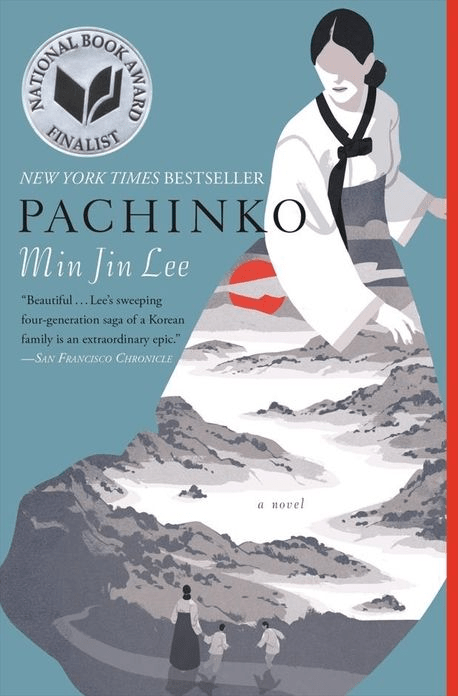
In recent years, three works have carved space in global consciousness for Korean and Korean-American narratives: Michelle Zauner’s memoir Crying in H Mart, Min Jin Lee’s novel Pachinko, and Lee Isaac Chung’s film Minari. Though distinct in form and scope, they are connected by a shared emotional terrain: stories of family, displacement, longing, and the fragile rituals through which memory persists. Each work reveals what is inherited, what is lost, and what we try to rebuild from fragments.

Together, these narratives form a cultural triptych of diaspora. In place of epic declarations, they offer quiet gestures—a grandmother planting herbs, a mother cooking kimchi, a child trying to translate pain. They ask: What are the small, persistent things that shape who we are?

I. Grief and Language in Crying in H Mart

Michelle Zauner’s memoir begins in a supermarket—H Mart, where the aisles are filled with Korean groceries and a longing too heavy to name. Zauner, lead singer of Japanese Breakfast, charts her mother’s death from cancer and the identity crisis it leaves in its wake. The book is a meditation on grief, but also on bilingual belonging. As her Korean falters, so too does her connection to a maternal history carried in language, gesture, and taste.

What makes Crying in H Mart so arresting is its refusal to universalize loss. Zauner’s mourning is culturally situated: the way she watches her mother peel fruit, the unspoken rules of filial piety, the silence between English and Korean. Her grief is textured by immigrant expectation and generational misrecognition. In that way, Zauner speaks for a generation of bicultural readers caught between tongues, mourning not only loved ones but the versions of self that die with them.

II. Lineage and Shame in Pachinko

Min Jin Lee’s Pachinko opens in a fishing village in Korea and ends in urban Tokyo, but its emotional arc spans four generations of a single family. It is a novel of survival and the soft violence of assimilation. Through the character of Sunja and her descendants, Lee examines the legacy of Japanese colonialism, the precarity of Korean identity abroad, and the social costs of silence.

Unlike Zauner’s memoir, where intimacy is built through food and domestic ritual, Pachinko shows how survival often requires severing such connections. There are moments when characters must abandon tradition to survive—a son who denies his ancestry to keep his job, a mother who hides her shame to preserve her child’s future. Lee does not moralize these choices; instead, she lets the slow accumulation of compromise and resilience speak for itself.

It is also a novel of women’s labor—emotional, economic, and cultural. Sunja’s strength is not in rebellion, but in the steadiness with which she endures. Her choices echo through time, shaping descendants who never know the full cost of their legacy. If Pachinko offers a lesson, it is that history is not just something we learn. It is something we inherit.

III. Immigrant Soil in Minari

Where Crying in H Mart focuses on loss and Pachinko on endurance, Minari dwells in hope. Lee Isaac Chung’s semi-autobiographical film tells the story of a Korean-American family who moves to rural Arkansas to start a farm in the 1980s. It is, on the surface, a familiar immigrant narrative. But beneath its simple plot lies a quiet radiance.

The emotional center of Minari is Soonja, the grandmother, whose arrival from Korea unsettles and ultimately transforms the household. She brings with her not only snacks and folklore, but also a reminder that memory is physical—lodged in plants, smells, rhythms. The minari she plants near a creek becomes a living metaphor for resilience: a plant that thrives where it is rooted, even in foreign soil.

There is little exposition in Minari. Chung lets glances, pauses, and miscommunications carry the emotional weight. It is a film of feeling rather than statement, and in that way, it mirrors the unspoken contracts of immigrant life: don’t complain, keep going, make it work.

IV. What Holds Them Together

Across these three works, we find no grand resolutions, no neat conclusions. Instead, they offer memory as process—fragmented, intergenerational, sensory. They suggest that identity is not a fixed inheritance but a field of negotiation.

  • In Crying in H Mart, that field is a grocery store aisle where a daughter remembers her mother through food.
  • In Pachinko, it is the layered sacrifices of four generations.
  • In Minari, it is a field by a creek where minari takes root.

What they share is a deep attention to the texture of lives. The mundane becomes sacred: cooking, planting, speaking, forgetting. These are the rituals through which memory persists, even when names fade.

V. From Memoir to Montage: Why It Matters

We often ask: What does a life story look like?

These works tell us: it is not always a biography or a formal timeline. Sometimes it’s a smell. Sometimes a story passed down half-remembered. Sometimes it’s a scene in a film where a boy watches his grandmother fall ill and still finds her spirit in a plant she left behind.

Together, Crying in H Mart, Pachinko, and Minari remind us that we don’t need to be famous or fluent to be remembered. We just need to be noticed, as we are.

Their stories are an invitation: to look more closely, to ask differently, to notice the soil where memory grows.

The Moment I’d Play at Your Funeral

So funny, so weird, so them. A moment that says it all.

You’ve seen the meme.

A video of Jon Rahm skipping a golf ball across a pond — and somehow sinking a hole-in-one at The Masters.
A grandpa launching into a dance-off after winning bingo night.
Someone catching a falling baby with one hand while holding a latte.

Caption?
“This moment was so iconic, I’d play it at their funeral.”

It’s a joke. But also… kind of perfect.


Because Some Moments Say: “Yep, That Was Them”

Not the job titles. Not the diplomas.
We’re talking about the moment when life caught them off guard —
and they handled it in the most them way possible.

Like:

  • That time they parallel parked into a space way too small — with five people clapping
  • When they saved the team presentation with a last-minute pun
  • The karaoke performance that should’ve been illegal (but got a standing ovation anyway)

These aren’t accomplishments.
They’re character.
And they stick.


The Accidental Legacy

What makes these moments special?

They weren’t curated. They weren’t planned.
They were pure chaos, charm, timing —
and unmistakably them.

That one ridiculous story everyone tells, again and again.
The moment they became a legend in the group chat.
The thing that still makes people laugh, even while crying.

If there were a funeral video montage, this would be slide one.
Before the violin music. Before the candlelight.

Just that one clip that makes you go:
“God, I miss that weirdo.”


It’s Funny — But It’s Also Memory

Laughter is memory.
And honestly, it’s one of the best ways we keep people close.

When we say,
“I’d play this at your funeral,”
we’re really saying:
“This moment — it was so you, it explains everything.”


A Prompt for You (and Your Group Chat)

Think of someone you love.
Now ask:

“What clip of them would you play at their funeral — just for the laugh?”

It might be:

  • The time they danced in the rain like they were in a drama
  • The firework accident that turned them into a neighborhood myth
  • That random night they made everyone in the restaurant sing along

Funny how sometimes the best tribute isn’t a speech.
It’s just a GIF.


The Real Highlight Reel

At StoryTable, we believe that a life story isn’t just serious interviews and timelines.
It’s also these weird, wonderful flashes.

The bloopers.
The “you had to be there” moments.

So the next time something chaotic, hilarious, or strangely beautiful happens —
Save it. Remember it.

Because someday, someone might say:
“This moment? Oh yeah. This is the one I’d play at their funeral.”

5 Questions They’ve Been Waiting to Be Asked

How to uncover the deeper stories hidden behind silence

We often assume we know our parents, grandparents, or loved ones simply because we’ve spent years beside them. We’ve seen their routines, heard their advice, eaten their food, maybe even argued over the same old things. But what if some of their most meaningful stories—heartaches, dreams, regrets, even moments of joy—have never been spoken aloud?

It’s not always because they don’t want to share. More often, it’s because no one has ever asked.

Many people carry entire worlds inside them that never surface in everyday conversation. Whether out of modesty, trauma, fear of being misunderstood, or simply habit, these untold stories remain quietly tucked away—waiting for the right moment, or the right question.

This post isn’t about perfect interviews or formal memoirs. It’s about presence, patience, and genuine curiosity. Because sometimes, all it takes is a small, thoughtful question to unlock a memory, a lesson, or a truth that might otherwise have stayed hidden forever.

What’s Been Left Unsaid

Because life isn’t just about what happened — it’s about what stayed quiet.

Some stories are told in dates and facts. Others live in the spaces between. These questions aren’t meant to summarize a life — they’re meant to open it. They invite pause. Reflection. And sometimes, healing.

They’re a place to begin. And if you’re lucky, they’ll lead to more.

1. What is something you’ve always wanted to throw away from your life — but couldn’t?
→ Because we all carry things: regrets, labels, moments we wish we could erase. Asking this isn’t about fixing. It’s about freeing.

2. What did you give up for your family or someone you loved — and how did it change you?
→ Because love is often made of quiet sacrifices. And most go unacknowledged.

3. What question do you wish you could ask someone who’s no longer with you?
→ Because grief doesn’t end with silence. Sometimes it begins there.

4. When did you feel like you were being strong for someone else — even when you weren’t okay?
→ Because many people are praised for their strength, when what they needed was permission to fall apart.

5. What truth about yourself have you carried, quietly, for too long?
→ Because everyone has a story they’ve never told — and maybe they’ve just been waiting for the right person to ask.

These aren’t just one-time questions. They’re doorways — leading to memories, emotions, and deeper truths that may not come out right away.

Ask one of these today.
Not for answers — but for closeness. And maybe, the beginning of something even deeper.

🕯️ Reading the Silence: What We Often Miss in Our Loved Ones’ Stories

When we think of remembering someone, we often picture their voice—what they said at dinner, the stories they repeated, the catchphrases that made us laugh. But in truth, much of who someone is exists between words: in the pauses, the gestures, the things they never said but always carried.


Not All Silence Is Empty

There’s a kind of silence that comes from deep within a person. It’s not awkward or accidental. It’s practiced. Cultural, even generational. Especially for those raised in hardship or war, or during times when emotions were a private matter, silence becomes its own language. It says: “This is how we survive.”

That’s why some elders may smile when remembering something that sounds painful. Or brush off questions with “It was nothing special”. But that doesn’t mean nothing is there. It means they’ve learned to carry weight quietly.


Memory in the Body

A clenched jaw when talking about school. A shift in posture when someone’s name comes up. A nervous habit that shows up in photos from the 1950s and still happens today.

These are clues.

Psychologists and anthropologists often speak of embodied memory—the idea that our experiences live not just in our minds, but in our muscles, in how we move, sit, gesture. It’s especially true for memories tied to trauma or deep emotion. They resist narration, but they don’t disappear. They become part of how a person is.


The Unspoken Emotions

Sometimes people never talk about a parent, a child, a first love. Not out of shame, but because it hurts too much to name. Other times, they avoid topics they’ve already turned into myth—stories rehearsed for others but emptied of real feeling.

Silence isn’t always avoidance. It’s sometimes a way of protecting the people they love—from the full force of a story that still aches.


Listening with More Than Ears

To understand our elders—or anyone, really—we have to practice another kind of listening:

  • Listen to tone: Is it too light for the subject? Too flat?
  • Watch the body: Where do they look? When do they fidget?
  • Notice the pattern: What do they always skip over?

Sometimes, gently returning to these skipped places opens something. But more often, simply noticing and holding space is enough. The act of asking again—and listening fully—is already a gift.


When Silence Is a Story

Not everyone wants to revisit the past. That’s okay.

But if we never even try to listen—to the words, the silences, the gestures—we miss the richness of who someone is beyond their resume, beyond their role in our life. We miss the contradictions, the humor, the heartbreaks they tried to carry alone.

Sometimes, the most powerful stories begin with silence.
They just need someone to sit with them long enough.

What the Body Remembers

Have you ever smelled something—roasted sesame oil, an old book, sun-warmed vinyl seats—and been transported straight back to a moment you hadn’t thought about in years? It’s not just nostalgia; it’s your body remembering. Science tells us that memory doesn’t live solely in the brain. It resides in scent, in texture, in posture, in the small details our bodies carry long after our minds forget.

In this post, we explore what it means to remember through the body. We reflect on how childhood memories—especially the ones that return without warning—can guide, comfort, and challenge us. And we offer practical ways to begin reconnecting with those stories, not just with your head, but with your senses.


The Memory Lives in the Muscle

Think back to your childhood. Not a specific story, but a sensation: the weight of a winter coat zipped too high, the sting of a scraped knee, the burnt sweetness of barley tea. These aren’t just random memories—they are the body’s bookmarks.

Neuroscientists have shown that sensory memory—especially smell and touch—are directly connected to the brain’s limbic system, where emotional memory is stored. That’s why a whiff of your grandfather’s cologne or the feel of a school desk under your fingers can bring back a whole world in an instant.

But there’s more than brain chemistry at work here. Cultural anthropologists have long studied “embodied memory”—how traditions, movements, even emotional habits are passed on and retained physically. If your mother always hummed while doing the dishes, you might find yourself doing the same without realizing it. Not because you decided to—but because your body remembers.

The Stories That Never Got Written

For many of us, childhood stories live under the surface. They’re felt rather than told. We remember the rules of the house through our posture. We recall a sibling rivalry not through a specific argument, but through the tension in our shoulders when that sibling calls.

Some of these memories were never spoken aloud. Maybe the adults around you didn’t talk much. Maybe no one asked. Or maybe certain experiences were too confusing to explain. But those moments left traces.

In our work preserving life stories, we often hear people say, “I don’t know what stories I have.” But once they begin with something small—a smell, a sound, a gesture—the rest follows. That’s not just memory. That’s narrative emerging from the body’s archive.

Sensory Prompts to Access Memory

Want to access these deeper, older memories? Here are a few prompts to try:

  • Smell: Open an old spice jar or childhood shampoo brand. What images come back?
  • Touch: Run your fingers over tree bark, corduroy, cold metal. What does your body recall?
  • Sound: Listen to a school bell, a cassette rewinding, a lullaby. What room are you in?
  • Taste: Eat something your caregiver made. Not the gourmet version—their version.
  • Movement: Mimic a childhood habit—jumping a crack in the sidewalk, tracing wallpaper patterns. How does it feel?

These are not just creative exercises. They are portals. Your senses are time machines, capable of returning you to places your mind forgot.

When Memory Is Painful

Of course, not every memory feels good. The body also remembers fear, confusion, or shame. A slammed door can bring up feelings long buried. A childhood smell might trigger unease instead of comfort.

That’s why revisiting embodied memory should be done gently. You don’t need to force recall. Let what surfaces come without judgment. And know that even difficult memories, when held with care, can offer insight. They show what you survived. They explain how you learned to move through the world.

Sometimes, these memories explain habits we didn’t understand—why we avoid certain sounds, why we tense during holidays, why we cry at smells others barely notice. When we listen with compassion, we start to see the full shape of who we are.

Sharing the Unspeakable

One of the most powerful parts of embodied memory is that it often reveals stories that words never caught. And when we begin to tell those stories—even haltingly—we give others permission to do the same.

A woman once shared a memory of her grandmother’s cracked hands washing rice. She had never thought of it as a story, but as she described it, she realized how much it said: about sacrifice, care, repetition, and silence. Her whole family came to see her grandmother differently.

Stories like this don’t need plot twists. They don’t even need beginnings or endings. They just need presence. If someone you love tells you, “I don’t have a story,” try asking them, “What does your body remember?” Then wait.

The Practice of Remembering

Memory is not a file cabinet; it’s a garden. It needs tending. It grows best when we return to it with curiosity, not judgment.

Here are a few practices to nurture embodied memory:

  • Take a “sensory walk” through your home or neighborhood. What do your senses pick up?
  • Keep a memory journal, not for events, but for impressions—textures, sounds, smells.
  • Share one small physical memory with someone close. A gesture, a sound, a scene.
  • Ask elders in your life to describe how something felt—not just what happened.

You’ll find that memory begets memory. One scent leads to a room, that room leads to a feeling, that feeling to a story. The past unfolds not in sequence, but in pulses.

Remembering Forward

Ultimately, the stories we tell aren’t just about the past. They shape how we walk into the future. When we recover the sensory threads of childhood, we reclaim a sense of self that is grounded, complex, and deeply alive.

And in doing so, we offer something lasting—not just for ourselves, but for those who come after. They, too, will one day ask: What did my parents or grandparents feel? How did they carry memory?

Let’s leave them something textured. Something real. Let’s give them what the body remembers.

Portraits in Motion: Why Biography Still Matters

Reading Parul Sehgal’s “Can You Ever Really Know a Person? Biographers Keep Trying”
By StoryTable Journal

By the time you’ve read a hundred pages into a good biography, you begin to feel the pull:
that uncanny sensation that someone else’s life has become your own. You look up from the book and the streetlights, your coffee mug, even the shape of your day feels somehow shaped by the choices of a long-gone stranger.

Parul Sehgal, in her elegant June 13 New York Times essay, dives deep into this phenomenon—not just how we read biographies, but why they endure. In an age of shrinking attention spans and minimalism across media—shorter books, smaller casts, quicker endings—biography remains proudly maximalist. “Fat, splendid and wholly implacable,” she writes. It resists the trend.

But more than its thickness, it’s biography’s insistence on the contradictions of character that makes it feel urgent. It asks: how do people become who they are? How does motive unfurl from memory? How much of the self is performance? Sehgal traces how recent biographers have turned away from “definitive portraits” in favor of fragmented, pluralist selves. This is not biography as monument-building, but biography as excavation.

She gives the example of James Baldwin—whose newly opened archives have produced not one, but two major biographies this year, each approaching him from different angles. One focuses on Baldwin’s erotic and domestic life, another emphasizes his shifting public personas. Both refuse neatness. Neither pretends to settle him. This, Sehgal suggests, is the strength of modern life-writing: the ability to hold contradiction without flattening it into a slogan.

And while the genre has often focused on the public sphere—the “eminent lives” of politicians, generals, artists—modern biography increasingly attends to the personal and even the ordinary. Paradoxically, it does this by embracing its limits. As she quotes biographer Michael Holroyd:

“The need to do this, to keep death in its place, lies deep in human nature.”

At StoryTable, we believe the same. Our journal began with the idea that everyone—famous or not—carries a story worth hearing. Not just for history’s sake, but because understanding lives, in their full complexity, helps us understand our own.


Biography as Empathy

This is where Sehgal’s essay turns from literary reflection to something more intimate. She draws attention to the most powerful shift in biography today: its willingness to remain unfinished. In her survey of books on Sylvia Plath, Baldwin, Adrienne Rich, Fanon, Candy Darling and others, what emerges is not a unified message but a kaleidoscope of contradictions. These are not books that pretend to know their subjects completely. Instead, they model how to stay with the questions.

It’s tempting to think of biography as an old-fashioned genre, interested in dusty letters and exact dates. But what makes it vibrant—what makes it necessary—is its devotion to character. The kind of character that cannot be coded into algorithms or inferred from behavior alone. Sehgal writes that AI can scrape the surface of motive (“I hate, I want”) but not its depth—its body, its shame, its backroom whispers. “A.I. knows only to enter through the front door,” she writes. Biography, by contrast, “observes the true story happening elsewhere.”


Understanding Those Closest to Us

What Sehgal’s essay reminds us—perhaps most painfully—is how difficult it can be to truly know even the people we live with. Parents, siblings, partners. We share meals, homes, even lifetimes, yet so often we miss the chance to understand them as they wish to be understood. Not just in what they did, but why they did it. What they hoped for. What hurt them. What they were trying to carry or repair.

Sometimes they don’t explain—out of habit, pride, or fear. Sometimes we don’t ask—assuming there’s time, or thinking we already know. But the truth is, many people leave this world never having had the space to tell their story, even if just as an excuse, an apology, or a hope.

That is why preserving life stories matters. It’s not just for posterity. It’s for connection—for offering those we love the dignity of being heard, and for ourselves, the grace of understanding.


The Quiet Urgency

Toward the end of her piece, Sehgal offers an unforgettable image: Baldwin as a child, daydreaming while watching his mother receive a scrap of black velvet from a neighbor. “That is a good idea,” his mother says, and for years Baldwin believes an “idea” is something dark, soft, and starry. It’s a moment too small for history books, too private for footnotes—but it is the core of biography. Not just what happened, but how it was felt.

At StoryTable, we’re building a space to capture these very moments—the velvet scraps, the quiet exchanges, the stories told too late. We believe that a person is not a set of events, but a process of becoming. We believe in the power of remembering someone as they truly were: complex, contradictory, unfinished.

Sehgal’s essay ends with Ellmann’s reflection on what drives biography:

“to know another person who has lived as well as we know a character in fiction, and better than we know ourselves.”

That is a challenge. And it is a gift.

Our goal, through writing, reflection, and dialogue, is to meet that challenge—one life at a time.